Appointments
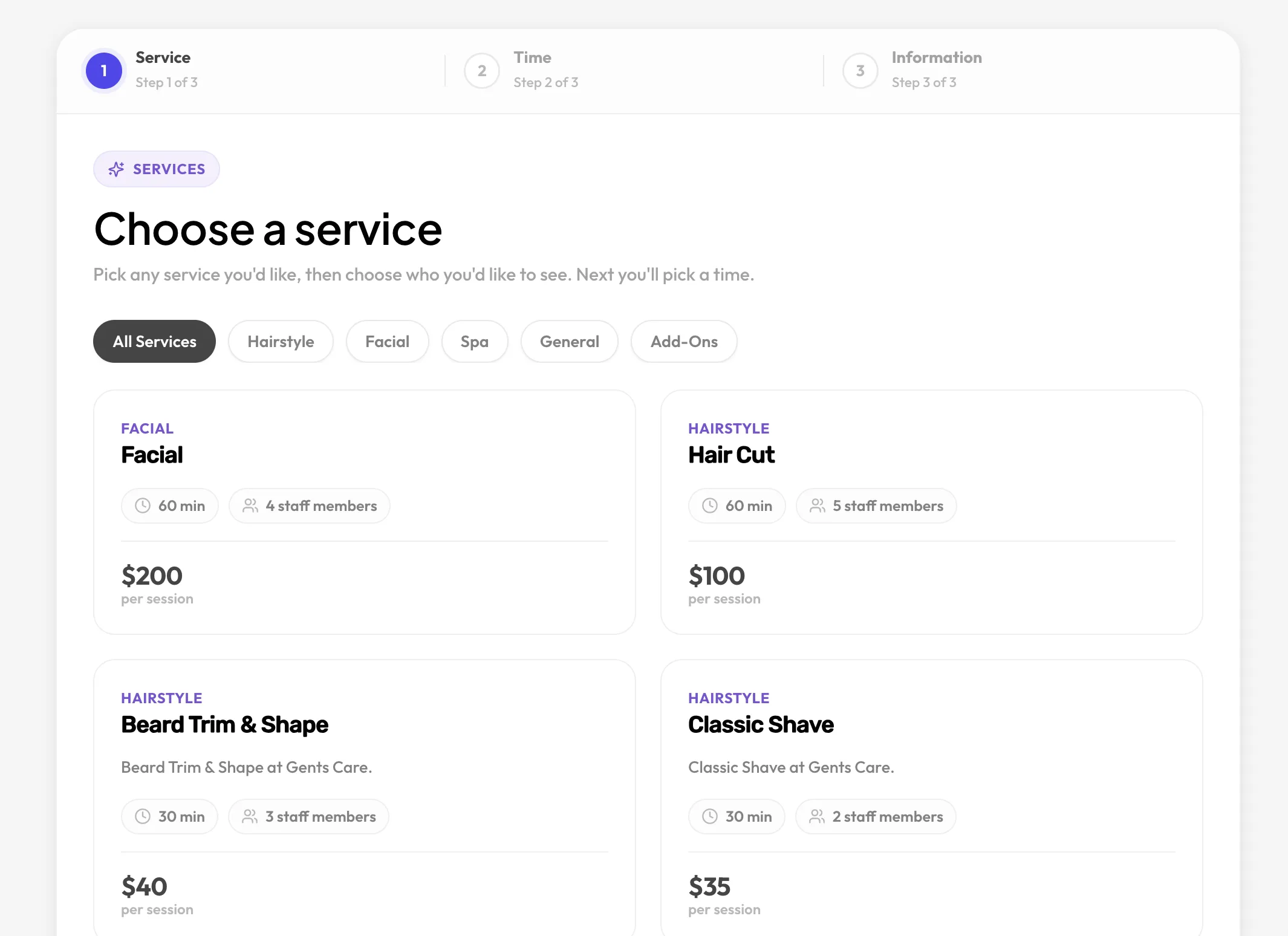
Services with staff and time slots. For anyone who books people into a calendar.
- Customers pick a service, a person and a time on their own
- Add-ons, buffers and days off are handled for you
- No slot can ever be booked twice
Schedopia lets customers book a time with your team or pick their own seats at your events, 24 hours a day, with no double-bookings. It is free, self-hosted, and charges nothing per booking.
Works with
Two ways to book
Most booking plugins do one or the other. Schedopia does both from the same plugin, so a studio can take one-to-one sessions and sell places at a Saturday class without running two systems.
Services with staff and time slots. For anyone who books people into a calendar.
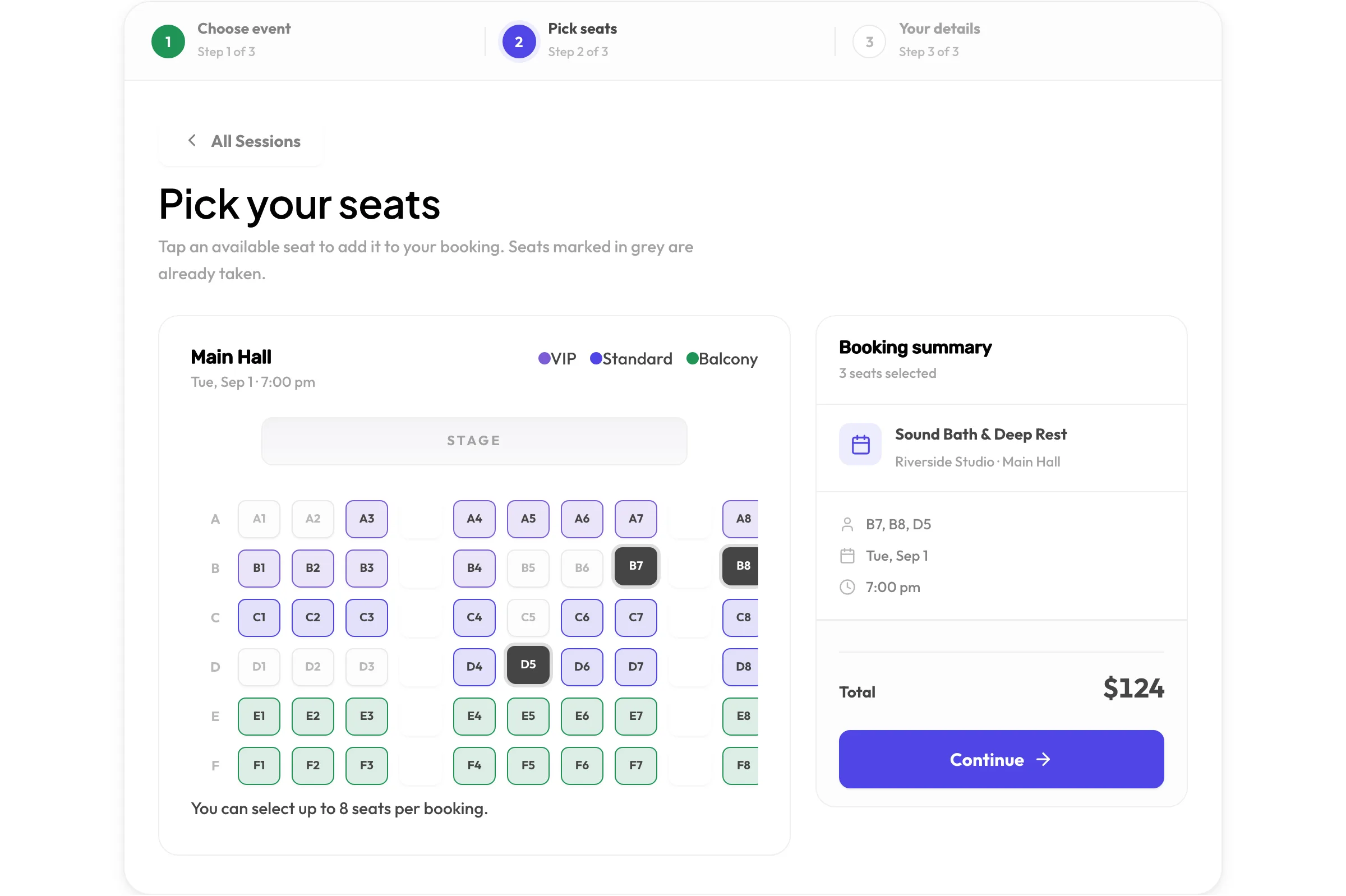
Dated sessions in a venue with a seat map. For anyone who sells places, not time.
How it works
No account to create, no service to connect. Everything runs inside your WordPress site.
Search for Schedopia under Plugins, then Install and Activate. The database tables are created for you.
The setup wizard asks whether you take appointments, sell seats, or both, then walks you through services and staff, or a venue and its seat map.
Add [schedopia_booking] to any page. Customers can book from that moment on.
Appointments
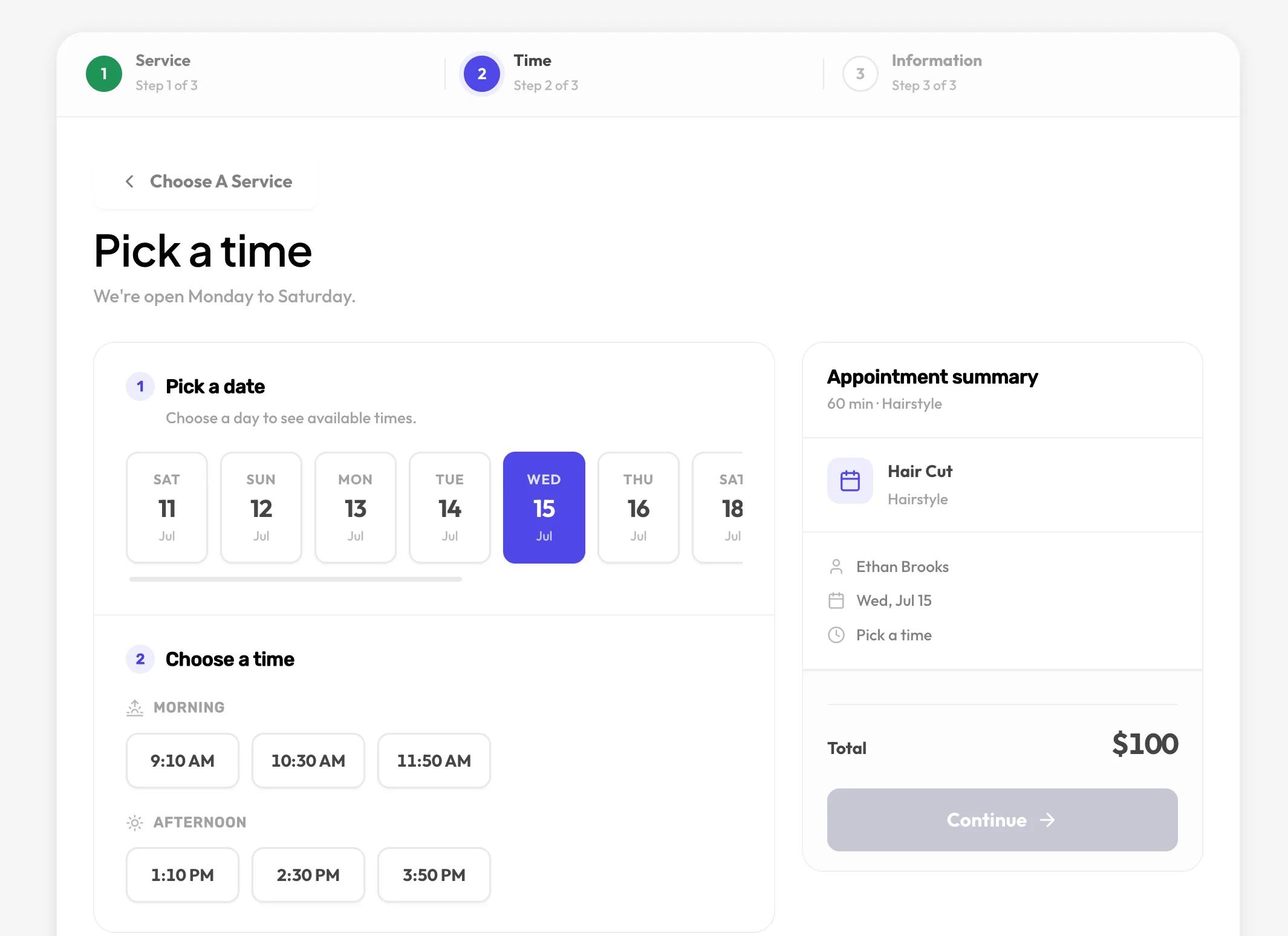
Customers see availability that reflects each person’s weekly hours, days off, buffers and existing bookings. When they confirm, the slot is checked again inside a database transaction.
Each service carries its own price and duration. Group them so a long menu stays easy to scan.
Offer extras alongside a service. The total and the slot length update to match.
Weekly hours per person, time off, gaps between appointments, and how many customers each slot can take.
Two customers can never take the same slot. The check runs inside a transaction, not in the browser.
Events and seats
Draw your hall once. Colour-coded tiers, greyed-out taken seats and a running total make picking seats as clear as it is at the box office.
Each hall has its own seat layout. Add a second hall to an event when the first fills up.
Draw rows and seats in the admin, generate seats in bulk, and group them into tiers such as VIP, Standard and Balcony with their own colours and prices.
Price a single seat differently from its tier when you need to.
Upcoming sessions list the date, venue, hall, duration and how many seats remain.
Admin
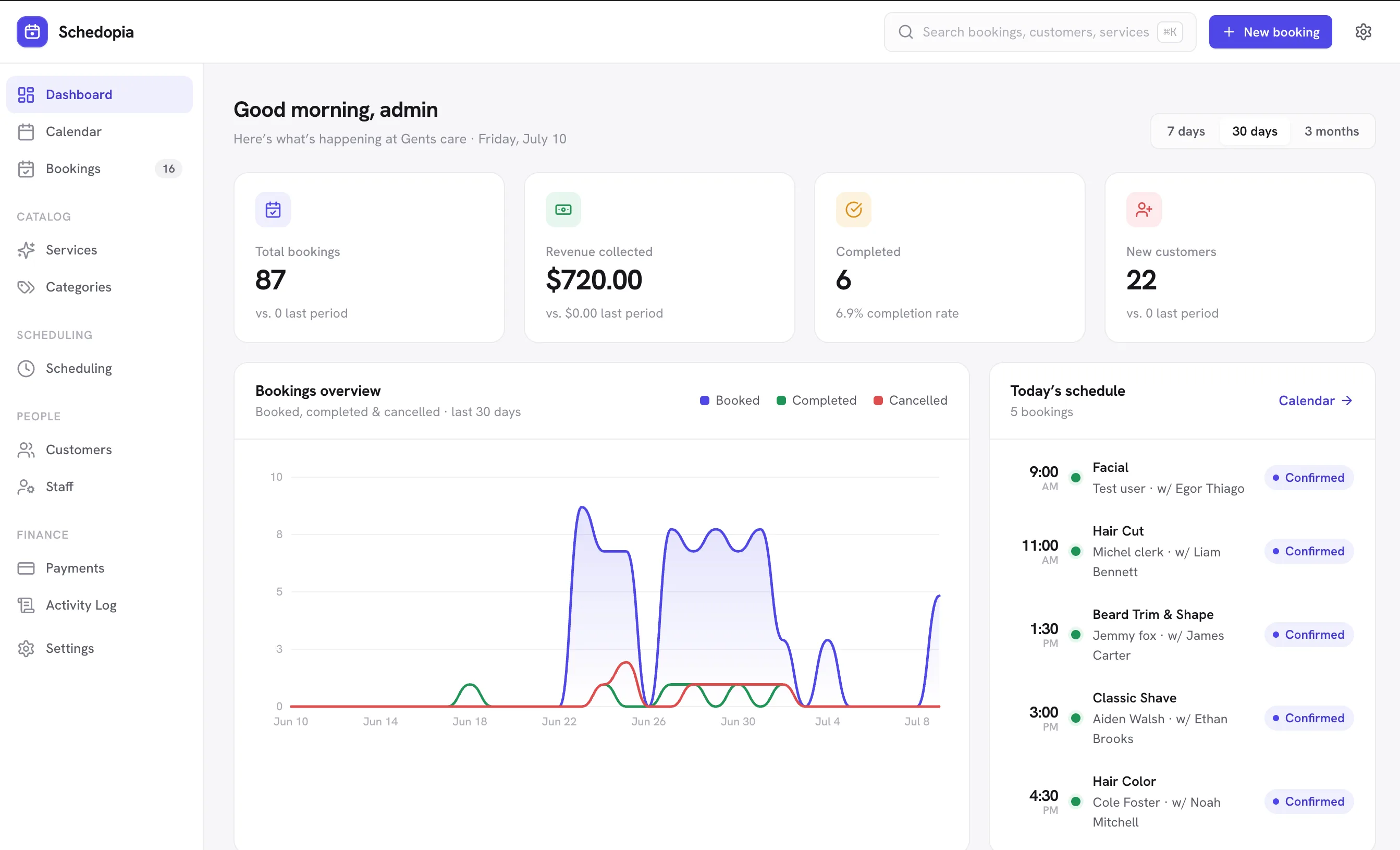
The dashboard answers the questions you actually ask each morning: what is booked today, how much has come in, who is new. Everything else is one click away.
Total bookings, revenue collected, completion rate and new customers, with a trend chart and today’s schedule.
Narrow by status, staff or service, and search across every appointment with its payment status and amount.
Every customer record shows what they booked and when.
Record cash, bank transfer, or mark a booking as paid. Every booking carries a payment status.
Booking form
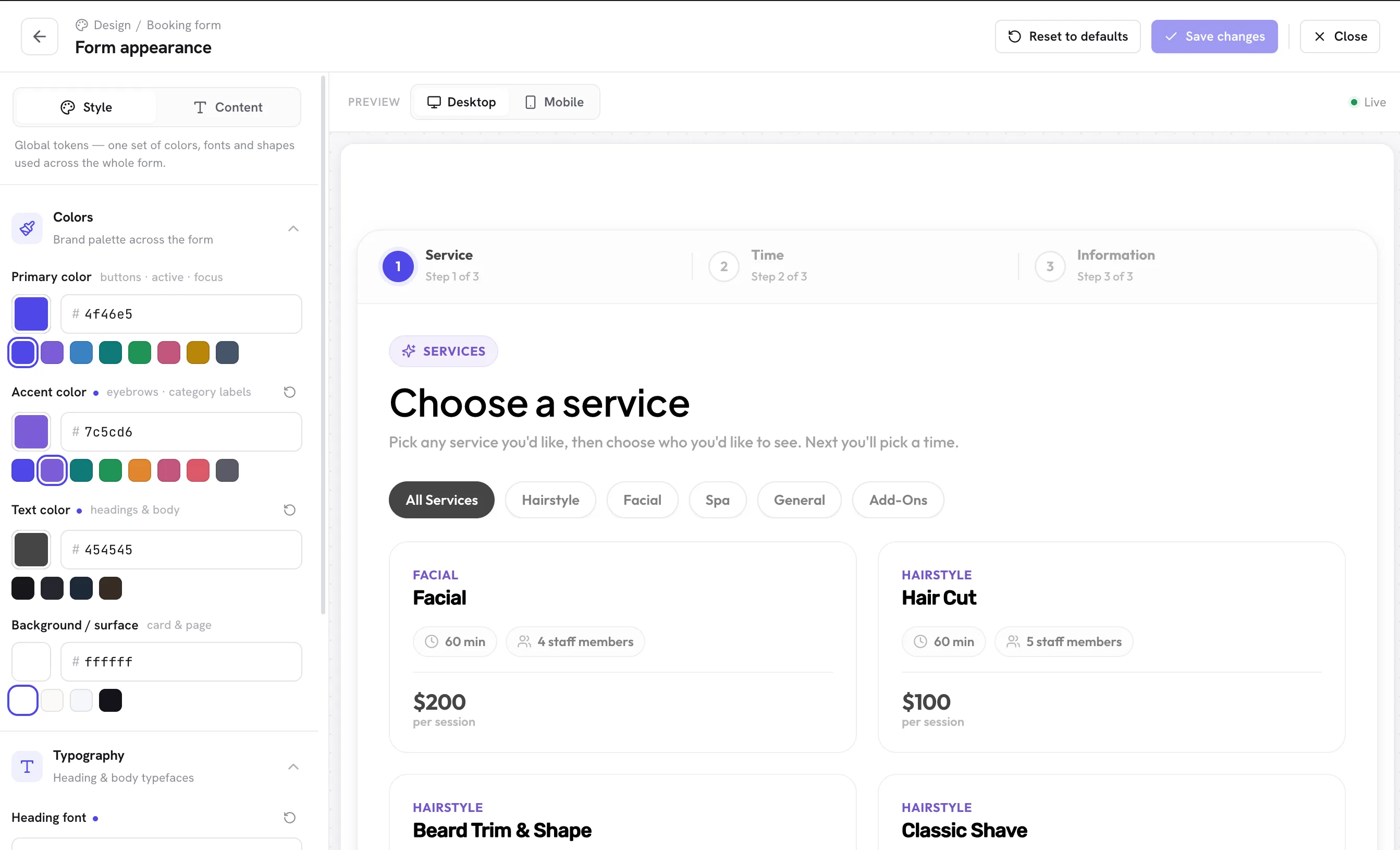
Change colours, fonts, shapes and buttons from the admin and watch the desktop and mobile previews update. No CSS required.
Designed for a phone screen first, then scaled up. Most bookings happen on one.
Colours, fonts, shapes and button style, with a live desktop and mobile preview as you change them.
Paste [schedopia_booking] into the block editor, Elementor’s Shortcode widget, or the classic editor. Add mode="event" for seat bookings.
Notifications
Confirmations go out the moment a booking lands. Reminders reduce no-shows. Customers can cancel from the email, inside the rules you set.
Customers get a clear email for every booking and every change.
Customers are reminded before their appointment. Your team hears about every new booking.
A secure link in the email lets customers cancel without an account. You decide how close to the appointment that is allowed.
Google, Outlook and Apple Calendar buttons in every confirmation, plus a read-only calendar feed to subscribe to.
Built for
The same plugin fits a two-chair barbershop and a 120-seat community theatre. Pick the mode that matches how you sell, or run both.
Stylists with their own hours, services grouped by type, add-ons such as a beard trim on top of a cut.
AppointmentsPractitioners with different availability, reminders that reduce no-shows, and records that stay on your own server.
AppointmentsA discovery call and a paid consultation as separate services, with your calendar feed kept in sync.
AppointmentsDated classes with a fixed number of places. Members reserve a spot and see how many remain.
Seated eventsOne-off sessions with a station per seat. Sell exactly as many places as you have benches.
Seated eventsA drawn seat map with VIP, Standard and Balcony tiers, live availability, and no seat sold twice.
Seated eventsWhy Schedopia
Hosted booking services charge per booking, hold your customer list, and can change terms at any time. Schedopia is a plugin on your own site.
The plugin is free and takes no commission on appointments or seats. Your revenue is yours.
Customers and bookings live in your WordPress database, in relational tables you can query.
Nothing is loaded from a CDN and nothing is sent elsewhere unless you enable reCAPTCHA yourself.
Slots and seats are validated in the database, so a race between two customers cannot slip through.
Remove the plugin and your bookings remain until you explicitly choose to delete them.
Free software from a studio with 12+ years building for the web and 500K+ users across its products.
Sample stories from the kinds of businesses Schedopia is built for.
For developers
Everything the admin can do is available over REST. Add a booking channel, a notification channel or a payment type by implementing an interface, and rely on the core to validate what comes through.
/wp-json/schedopia/v1/BookingSource, NotificationChannel, PaymentMethodRelational tables prefixed wp_schedopia_*Every booking, whether from the form, the API or an extension, passes through the same validated path.
Pricing
The plugin on WordPress.org is the whole product, not a trial. A Pro addition is in development for teams that need more.
$0forever
The complete plugin, on WordPress.org. No per-booking fees, no seat commissions, no usage limits.
Coming soon
An optional addition for teams that need more. Details and pricing will be announced to the waitlist first.
This form isn't connected yet. Set PUBLIC_FORM_ENDPOINT to enable it. In the meantime, email [email protected].
Questions
Yes. Schedopia is a complete, self-hosted booking plugin for appointments and event seat reservations, released under the GPLv2. There are no per-booking fees and no seat commissions.
Not yet. Schedopia records manual and offline payments: cash, bank transfer, and mark-as-paid. The booking form uses a pay-on-arrival flow, which keeps friction low. Payment methods are extensible through the PaymentMethod driver interface.
Yes. The [schedopia_booking] shortcode works in any editor, including the Gutenberg Shortcode block and the Elementor Shortcode widget. One booking form can appear per page.
Yes. The setup wizard asks whether you want appointments, events, or both. Use [schedopia_booking] for appointments and [schedopia_booking mode="event"] for seat bookings.
Yes. Every appointment is validated against real staff availability, and every seat reservation against the seats already taken, inside a database transaction. Two customers can never take the same slot, and a seat can never be reserved twice for the same event.
Not unless you ask it to. By default the plugin contacts no external service and loads nothing from third-party CDNs. The only optional integration is Google reCAPTCHA v3, which runs only when you enable it and add your own keys.
WordPress 6.5 or later and PHP 8.1 or later. Schedopia is tested up to WordPress 7.1.
Your bookings, customers and settings are kept by default. Data is deleted only if you explicitly opt in before uninstalling.
Install Schedopia from WordPress.org, run the setup wizard, and paste one shortcode. If you would rather talk it through first, we are happy to.